
 As a previous user of the now defunct Infinality repo I was looking for something similar in Fedora 26+ and came across this COPR repository. This used to follow the infinality fonts guide but I’ve updated it for recent versions of Fedora. Follow the instructions below and give yourself some really awesome looking fonts in Fedora.
Install RPM Fusion Repos
You’ll need the RPM Fusion repos if you don’t have them already, you want them anyway.
dnf install https://download1.rpmfusion.org/free/fedora/rpmfusion-free-release-$(rpm -E %fedora).noarch.rpm https://download1.rpmfusion.org/nonfree/fedora/rpmfusion-nonfree-release-$(rpm -E %fedora).noarch.rpm
Download and Enable the Font Repo
dnf copr enable dawid/better_fonts -y
Install Improved Font Packages
dnf install fontconfig-enhanced-defaults fontconfig-font-replacements
Reboot or log out/in to X11 and you should see some great notable visual improvement in browser, terminal and office applications.
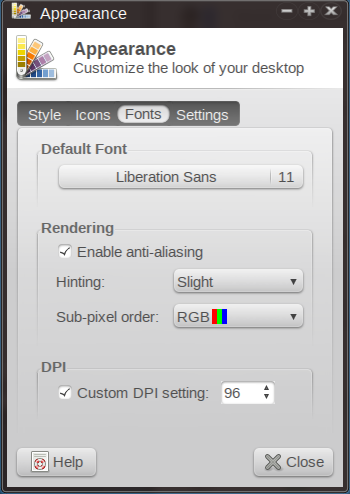
I’m using XFCE and also have the following options set:
- Hinting: Slight
- Use Full for lower-resolution screens
- Sub-pixel order: RGB
- DPI -> Custom DPI Setting -> 96
- Default Font: Liberation Sans 11
- xfce4-terminal font: Deja Vu Sans Book Mono 12





 hobo.house